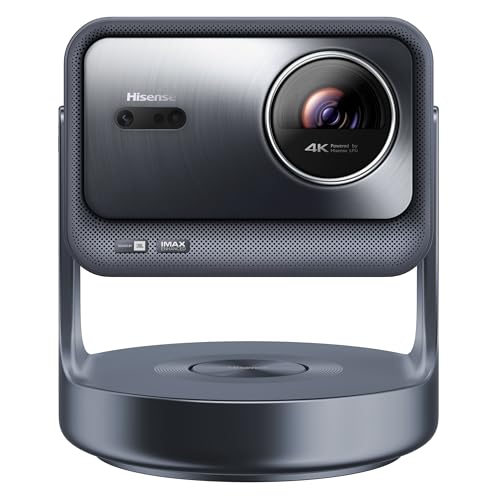
The Hisense C2 Ultra is the premium all-in-one in our ranking, and its trick is flexibility. It is a compact triple-laser 4K projector on a built-in gimbal, so you can point it at a living-room wall tonight and at the bedroom ceiling tomorrow without a mount, a bracket or a stack of books. That makes it a different kind of product from the fixed-position home theater machines elsewhere in the lineup.
This profile draws on the maker’s published specifications; where a figure is missing, we say so. Hisense does not state some numbers, such as input lag or throw ratio, and we flag those below.
Who the Hisense C2 Ultra Is For
It suits renters and apartment dwellers who cannot drill into ceilings, couples who want to watch a movie in bed, and families that want one projector for the living room, the basement and the occasional garage movie night. It also suits Xbox players who want a big screen without a permanent install, since Hisense markets it as Designed for Xbox.
It is a poor fit if you want the cheapest 4K projector, need a battery for camping, or plan to watch in a bright room every day. A projector this compact has a limited light output to work with.
Light Source and Brightness
According to Hisense, the C2 Ultra uses its Tri-Chroma triple laser light source, meaning separate red, green and blue lasers. Compared with a lamp, a laser source holds its brightness longer, starts quickly and can reproduce rich color. Hisense’s page gives no further laser details, however.
According to Hisense’s launch announcement for the C2 series, the C2 Ultra delivers 3,000 ANSI lumens and a 2,000:1 contrast ratio, and all three C2 models cover 110% of the BT.2020 color space. ANSI is the more conservative, standardized way to rate brightness. The unit matters: ANSI lumens, ISO lumens and a maker’s own “lumens” are measured differently and cannot be compared directly. A bright number does not turn a living room with open blinds into a theater. For any projector in this class, plan on a dim or dark room and size the image to the light available.
Resolution and Picture Processing
Hisense lists 4K resolution, with 4K AI upscaling for lower-resolution content. Upscaling matters because much of what people stream is not true 4K, and good processing smooths it out on a large screen. ProjectorCentral’s spec listing for the C2 Ultra shows Dolby Vision and IMAX Enhanced support, along with HDR10 and HLG. Hisense’s launch announcement also mentions 3D playback across the C2 series.
Two setup features affect the picture. First, the 1.67x optical zoom keeps the image at 4K as you resize it, which a digital zoom cannot do. Second, wall color adaptation, which according to Hisense can adjust for up to seven wall shades, helps if you have no screen and are projecting onto a beige or light gray wall.
Placement and Throw Distance
The gimbal is the headline. Hisense says it rotates 360 degrees horizontally and 135 degrees vertically, and that the projector can be mounted on a wall, ceiling or floor. In practice, you set it on a shelf, a nightstand or the floor, and it turns toward the surface you want. Automatic keystone correction and automatic focus, which adjust to distance and screen size, handle the rest. Hisense also lists 3D Time of Flight sensing for quick fitting, along with smart object avoidance, which shrinks the image around obstacles.
Hisense says the projector can adapt to screens from 65 to 300 inches. Hisense’s page does not give a throw ratio, so we cannot translate that into feet. Use the maker’s projection calculator or the manual to confirm your room has the distance. As a general rule, a larger image looks dimmer: 100 inches in a dark room will look punchier than 200 inches.
In a bedroom, projecting onto a white ceiling works surprisingly well as long as the ceiling is smooth and the room is dark. Use blackout curtains if streetlight comes through the window.
Smart Features and Sound
Hisense says the projector has built-in streaming for Netflix, YouTube, Disney+ and other services, plus a voice assistant. The launch announcement names the VIDAA smart OS, not Google TV, so check that the apps you rely on are in the VIDAA store, or plug in a streaming stick. HDMI and USB ports are listed. Hisense does not state how many HDMI ports there are or what version they are.
On audio, Hisense lists DTS Virtual:X, which simulates rear and height channels without extra speakers. According to Hisense’s launch announcement, the C2 Ultra has a JBL 2.1-channel audio system with a built-in subwoofer, the most complete sound system in the C2 series. It will not replace a real surround setup, but it beats the thin sound of many compact projectors. If you plan to use a Bluetooth speaker or headphones for late-night watching, check pairing before you buy.
Hisense also lists an eye protection feature that dims the screen when it detects people approaching. That is a useful safeguard for a laser projector you will aim around a room, particularly in a house with kids or pets.
Gaming
Hisense markets the C2 Ultra as Designed for Xbox, and the pages we read give no latency figure. Without a number, we will not rank it against projectors that list one. If you play competitive shooters, look for a 4K/120 Hz or low-millisecond input lag figure from the maker before you commit. For casual gaming on a big screen, the Xbox support is a good sign.
Noise, Heat and Ownership
Hisense does not state a noise level, weight, dimensions, warranty or laser lifespan on the page we read, so we cannot give you figures. Laser projectors still have fans, and a compact body means those fans work hard to move heat. Before buying, look for those details on Hisense’s site and in the manual. As with any projector you move around, keep the vents clear and dust off the lens.
Because the gimbal lets you aim it, you may be tempted to use it on a bed or bedside table. Use a stable surface and give it airflow. Do not set it on soft bedding, which can block the vents.
Who Should Skip It
- Buyers who want a bright-room experience. A dedicated ultra short-throw laser TV with the right screen, like the Hisense PX3-PRO, is the better route.
- Anyone who needs a built-in battery for camping or backyard use. Hisense does not list one.
- Shoppers who want to spend as little as possible. This is a premium-tier product.
- People who need an official input lag figure before buying: Hisense does not publish one on the pages we read.
Alternatives Among Our Picks
If you want a compact 4K projector with a flexible stand and a more detailed spec sheet, the XGIMI Horizon S Pro tilts up for ceiling projection and lists its throw ratio, noise and weight on the maker’s page. If you would rather have a fixed living-room projector with lens shift, the Epson Home Cinema 2350 is the easier choice.
Final Take
The Hisense C2 Ultra is the projector for people who value freedom of placement above everything else. A triple laser source, a wide-rotating gimbal, a zoom that keeps 4K and automatic setup make it a premium option for bedrooms, apartments and multipurpose rooms. Its weak spots are the missing input lag and throw-ratio figures on Hisense’s pages, and the VIDAA app store, which is smaller than Google TV’s.
See price on Amazon
To see how it stacks up against the other nine models, read our ranking of the best projectors of 2026.
Sources