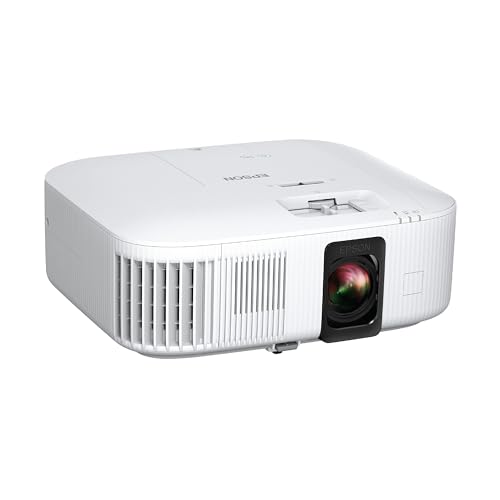
The Epson Home Cinema 2350 is the kind of projector many first-time buyers should start with: a bright, colorful, 3LCD living-room machine with Android TV built in and a lens that moves. It is not the smallest, the sleekest or the cheapest projector in our lineup, and it does not try to be. Its case is simpler: it stays vivid when the room is not pitch black, it is easy to position, and it comes from a brand that has built home projectors for decades. We explain its place in our ranking below.
This profile draws on the maker’s published specifications and sets them against how people use projectors at home. Where a figure is missing, we say so rather than fill the gap.
Who the Epson Home Cinema 2350 Is For
This model suits a household that wants a big picture in a family room or den without turning the space into a dedicated theater. Think movie night with a lamp on in the next room, Sunday football on a 100-inch screen, or kids playing a console in the afternoon with the blinds half closed. It also suits buyers who care about color and who have already been burned by a projector that looked punchy in the spec table and washed out in real life.
It is less obvious for people who need a tiny, portable device, anyone who wants to ceiling-mount and forget, or buyers who hate the idea of maintenance. A lamp-based projector asks for a little more from you over the years than a laser model does.
Brightness Explained Plainly
Projector brightness is the most abused number in the category, so it is worth slowing down. Epson lists 2,800 lumens of color brightness (IDMS rated) and 2,800 lumens of white brightness (ISO rated). Those are two different measurements. White brightness measures how much light the projector puts out with a full white image. Color brightness measures how much light it puts out across colors, which is what you actually see in a movie.
A projector that has no color brightness figure may produce a much dimmer color image than its white lumens suggest. That happens most often with single-chip DLP designs, where a color wheel splits the light over time. Epson’s 3LCD design uses three panels, one each for red, green and blue, so every color is on screen at the same time. The practical effect, according to the way Epson advertises the product, is that color brightness matches white brightness.
Do not compare Epson’s 2,800 lumens directly with an ANSI or ISO figure from another maker as if they were identical. ISO lumens, ANSI lumens and manufacturer-specific numbers are measured under different procedures, and a laser projector’s rating is not comparable one-to-one with a lamp’s. Treat the figure as a sign of how bright the machine is in its class, not as a promise about what you will see in your room.
Even a bright projector looks best with some light control. Expect the best contrast and color with the room dim, and think about a light-colored wall or a proper screen. Direct sunlight on the wall will beat any lamp projector in this price tier.
4K PRO-UHD Is Pixel Shifting
Epson calls the resolution 4K PRO-UHD, and the footnote on its page explains that the projector shifts each pixel to produce an image on screen. In plain terms, the panels are not native 4K. The projector moves the image very quickly to place extra pixels between the ones the panels can produce, so the final picture carries detail close to that of a 4K signal.
This is common in the category and it works. On a 100-inch screen, the difference between pixel-shifted 4K and a native 4K chip is hard to notice for most people from normal seating distances, and the projector still accepts 4K HDR input. But it is worth saying clearly so that nobody buys it believing it has a native 4K panel. If native 4K matters to you, compare it against the 4K DLP models elsewhere in our lineup.
HDR and Picture Features
According to Epson, the projector supports HDR and HLG, with HDR performance depending on select third-party devices. A lamp projector at this level cannot match the peak brightness of a living-room TV, so HDR here means a wider range and better tone mapping, not the searing highlights of a flagship OLED. Used in a dim room, it adds depth to movies that are mastered in HDR.
Epson’s page does not list a zoom ratio, throw ratio or screen size range, so we cannot give you a distance in feet. What Epson does list is vertical lens shift.
Placement and Lens Shift
Lens shift is the unglamorous feature that makes the biggest difference on installation day. With vertical shift, you can put the projector on a shelf behind the couch, on a coffee table or on a ceiling mount and move the image up or down on the wall by turning a dial, with no loss of sharpness. Digital keystone correction, by contrast, stretches the image electronically and can soften edges.
For most rooms, a good plan is to decide where the screen goes, find the projector position that matches Epson’s throw distance for your screen size using the Epson projector calculator or the manual, then use the shift to fine-tune. Because Epson’s page gives no throw ratio, measure your own room before you mount anything. Renters can use a shelf or a rolling cart instead of drilling.
Smart Features and Sound
The projector runs Android TV, and its remote has voice search through Google Assistant. That means streaming apps, a Play Store and casting are available without a separate stick. Epson’s page does not state the Android TV version, so check that the apps you care about are listed before you rely on them. If you would rather use a streaming stick or a console, the HDMI ARC port and the Audio Out port make it easy to route sound to a soundbar or receiver.
The integrated speaker is a 10 W bass-reflex unit. It is fine for news or a casual show, but a bigger room and an action movie will quickly want more. Bluetooth wireless audio is listed, so a Bluetooth speaker or headphones can be paired, which helps for late-night viewing. Plan on a soundbar if you care about movie sound.
Gaming
Epson lists an input lag of under 20 ms in its low latency mode. For a projector, that is a respectable figure and fine for most console games, sports titles and adventure games. It does not list a 120 Hz mode on the page we opened, so players who want high-refresh gaming should compare with models that advertise it. For casual gaming on a big screen with friends, it does the job and keeps colors rich.
Noise and Ownership
Epson does not give a noise figure on the page we opened, so we will not guess. Lamp projectors typically have a fan that is audible in a quiet room, which matters less with the speaker or soundbar on and more if you plan to use it in a small bedroom. Put it behind the seating when you can.
The bigger ownership point is the lamp. Epson lists a replacement lamp (ELPLP97) as an accessory and a 90-day lamp warranty, along with a two-year limited projector warranty and two-business-day replacement with free shipping. The page does not state lamp life hours, so look at the specification sheet before you decide how much maintenance you are comfortable with. A laser model avoids lamp swaps, but typically costs more for similar brightness.
Who Should Skip It
Skip the Epson Home Cinema 2350 if any of these apply:
- You want a projector you can tuck in a backpack. This is a full-size home unit.
- You want the shortest possible distance to the wall. A short-throw or ultra short-throw model, like the Hisense PX3-PRO, sits right in front of the screen.
- You want to aim the image at a ceiling or wall with a motorized gimbal. The Hisense C2 Ultra is built for that.
- You never want to touch a consumable. Laser models avoid lamp replacement.
- You want native 4K without any pixel shifting.
Alternatives Among Our Picks
If you like the idea of a bright 4K machine but want a short-throw design for a smaller room, the BenQ TK705STi is the closest relative: a 3,000 ANSI-lumen 4K projector with a 0.8 throw ratio according to BenQ. If you want an all-in-one laser that moves between rooms, the Hisense C2 Ultra is the premium alternative. Both take more thought at purchase time, but they solve different problems.
Final Take
The Epson Home Cinema 2350 earns its first place in our ranking by being useful in more homes than anything else we compare. Matching color and white brightness, a lens that shifts, Android TV, HDR support and low input lag make it a flexible choice. The trade-offs are plain: pixel shifting instead of native 4K, a lamp to replace and a modest speaker. If those fit your plans, this is a very safe place to start.
See price on Amazon
To see how it stacks up against the other nine models, read our ranking of the best projectors of 2026.
Sources