We earn a commission if you buy through our links, at no extra cost to you.
Best Projector for a Bedroom: Wall or Ceiling
How to pick a bedroom projector: ceiling vs wall, throw distance in a 10x12 ft room, fan noise, blackout, no-drill setups, and which models fit.
At a glance
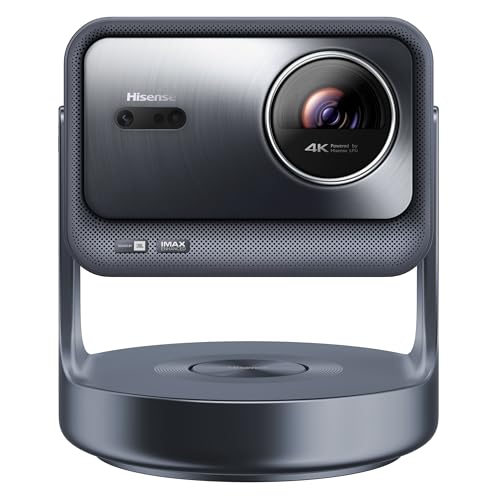
For watching movies in bed, the Hisense C2 Ultra aims anywhere with its gimbal, and the XGIMI Horizon S Pro tilts up to the ceiling in 4K. The XGIMI MoGo 3 Pro is the small, no-drill pick, and the Dangbei Atom is a slim shelf laser for the wall.


A projector in the bedroom solves a specific problem: you want a big picture for a movie at night, you do not want a 65-inch TV on the wall, and you would like the whole thing to disappear when the lights come on. Done well, it is the closest thing to a private cinema. Done badly, it is a noisy box aimed at a lumpy ceiling. This guide covers what matters in a typical American bedroom, then matches site models to the way you plan to watch.
One note first, because the search term is ambiguous. Star and galaxy night-light projectors, the kind that throw drifting stars on the ceiling, are a different product. Everything below is about video projectors for movies, streaming and games.
This guide draws on the makers’ published specifications; where a figure is missing, we say so.
Wall or Ceiling: Decide This First
Most bedroom projectors point at the wall opposite the bed. A few point at the ceiling so you can watch lying down, and the choice drives which models make sense.
Wall projection is the easy default. You get a normal upright picture, and you can use a screen or a plain light wall. It works best when you sit up in bed or on a sofa, and it needs clear floor or shelf space in front of the wall.
Ceiling projection suits people who watch lying flat, and it keeps the floor clear. It asks more of the room: the ceiling should be smooth and white, the room should be properly dark, and the projector needs a stand or gimbal that tilts upward. Hisense’s launch announcement for its C2 series says the projectors can project onto any surface, even the ceiling, with 360 degrees of horizontal rotation and 135 degrees of vertical adjustment. XGIMI lists front-ceiling and rear-ceiling projection modes on the MoGo 3 Pro and Horizon S Pro, along with a built-in stand that tilts up.
A practical tip: lie down in your normal position and look at the ceiling for a minute. If a light fixture, a fan or a heavy texture sits right where the picture would land, plan on the wall instead.
Throw Distance in a 10 by 12 Foot Room
Projectors are described by throw ratio, the distance from lens to surface divided by the picture width. A 1.2:1 ratio, which XGIMI lists for the MoGo 3 Pro and Horizon S Pro and Dangbei lists for the Atom, means the lens sits 1.2 times the image width from the wall. The arithmetic is our own, so confirm it against the maker’s planner.
| Picture size (16:9 diagonal) | Picture width | Lens distance at 1.2:1 |
|---|---|---|
| 60 inches | about 52 inches | about 5.2 feet |
| 80 inches | about 70 inches | about 7 feet |
| 100 inches | about 87 inches | about 8.7 feet |
| 120 inches | about 105 inches | about 10.5 feet |
Now apply that to a 10 by 12 foot bedroom with the bed against a short wall. The wall opposite the bed is about 12 feet away. A projector on a dresser or shelf near the bed can easily sit 8 to 11 feet from that wall, so a 90- to 100-inch picture lands naturally. That is already a very large image for a bedroom. If the projector sits on a nightstand beside you, the usable distance shrinks, so you will want a smaller picture or a shorter throw.
For the ceiling, think of the vertical rise. Take an 8-foot ceiling and a nightstand about 2 feet high: the beam travels at least 6 feet to the ceiling. At 1.2:1, 6 feet corresponds to a picture about 5 feet wide, roughly a 70-inch diagonal. Tilting the projector pushes the beam longer and the picture bigger, and the automatic keystone correction on these models reshapes the trapezoid. XGIMI notes that for accurate calibration the side throw angle should not exceed 40 degrees, and that keystone may need manual correction in some rooms.
Two cautions. The Hisense C2 Ultra has a 1.67x optical zoom according to Hisense, but Hisense’s pages give no throw ratio, so we cannot convert its picture size into feet. And digital zoom, which Dangbei lists for the Atom, only shrinks the picture. It cannot make a big image from a short distance.
Lumens and a Dark Room
Bedrooms are the easiest room to darken, which is why small projectors work there. Brightness is quoted in different units, and they are not interchangeable. ANSI lumens come from a standardized averaging method. ISO lumens follow ISO 21118, and XGIMI’s footnote says its value is measured in the brightest mode under laboratory conditions. Never compare an ANSI figure with an ISO figure as if they were equal.
Rules of thumb for a bedroom:
- A mini projector rated at 450 ISO lumens, such as the XGIMI MoGo 3 Pro, looks vivid at 80 to 100 inches in a dark room and pale with a lamp on.
- A laser rated at 1,200 ISO lumens, such as the Dangbei Atom, or a model rated at 1,800 ISO lumens, like the Horizon S Pro, tolerates a dim room with a bedside lamp low.
- The Hisense C2 Ultra is rated at 3,000 ANSI lumens in Hisense’s launch announcement, which gives it the most headroom, but a larger picture still looks dimmer than a smaller one.
Blackout curtains matter more than lumens. Streetlight leaking around a window lifts the black level of any picture and makes it look washed out. A pair of lined curtains or blackout shades costs less than stepping up a brightness class.
Wall, Ceiling Paint and Screens
You do not need a screen. A flat white or light gray wall works, and several of these projectors adapt their colors to the wall: Hisense says the C2 Ultra can adjust for up to seven wall shades, and XGIMI lists wall color adaption for the Horizon S Pro. Satin or matte paint looks better than gloss, which causes glare. Skip a textured wall if you can, because texture throws tiny shadows at an angle.
For the ceiling, flat white paint is ideal. Popcorn texture looks like a field of bumps in a bright scene. If you are a renter and cannot repaint, a wall is the better choice.
Noise: Fans Next to Your Pillow
A projector is a hot light source with a fan. In a living room you tune it out. Next to your head you may not. Manufacturer noise figures are measured under set conditions, so treat them as a guide:
- XGIMI lists 32 dB or less at about 3.3 feet (1 meter) for the MoGo 3 Pro.
- Dangbei lists under 24 dB in Standard Mode, measured at 77 degrees Fahrenheit, for the Atom.
- XGIMI says the Horizon S Pro and MoGo 3 Pro fans can get louder in their brightest mode, and recommends other modes for regular viewing. The noise figure for the Horizon S Pro is not one we could confirm, so we quote none.
- Hisense does not publish a noise level for the C2 Ultra.
Put the projector at the foot of the bed or on a shelf instead of beside your ear, and use a standard or eco brightness mode at night.
Sound, and Not Waking Anyone
Built-in speakers are fine for a small room, but they carry. For late-night viewing, Bluetooth headphones are the easy fix. Nebula’s support pages describe pairing Bluetooth headphones in the settings, and say the built-in speaker turns off when headphones or an external speaker connect. Dangbei lists Bluetooth 5.1 and a 3.5 mm output for the Atom. XGIMI’s MoGo 3 Pro doubles as a Bluetooth speaker, according to XGIMI. Check that your chosen model supports Bluetooth audio output, not just input.
Mounting Safely, Renters Included
The nice thing about the models below is that none of them needs a mount. They sit on a nightstand, a shelf or a dresser, and tilt or turn to the surface. A few rules:
- Use a stable, flat surface at least as wide as the projector. Do not rest it on a pillow, a blanket or the bed itself, because soft bedding blocks the vents and the projector can tip.
- Keep the vents clear of curtains and bedding.
- Keep the power cable out of the walkway.
- If you want something overhead, find a joist or stud first. Drywall alone is not a safe anchor for a projector, and a falling unit is a hazard to anyone below.
- Renters: a shelf or a nightstand needs no drilling, so there is nothing to patch when you move out.
Which Models Fit a Bedroom
Here are the site models that suit this room, in the order we would consider them. For the full lineup see our 10-model projector comparison.
Hisense C2 Ultra: Aim It Anywhere
A premium 4K triple-laser projector on a gimbal that turns to the wall or ceiling without a mount. Best for people who want the easiest placement and the most brightness.
According to Hisense, the C2 Ultra has a 3,000 ANSI lumen triple-laser source, a 2,000:1 contrast ratio and a JBL 2.1 sound system with a built-in subwoofer. The gimbal rotates 360 degrees horizontally and 135 degrees vertically, so it can aim at a wall one night and the ceiling the next, and it needs no stand. The software is Hisense’s VIDAA operating system, not Google TV, so confirm your apps are in its store. It also has no battery, and Hisense’s pages do not give a throw ratio, noise level or input lag. It is the premium choice and has the most light to work with. See our Hisense C2 Ultra profile.
XGIMI Horizon S Pro: 4K With a Tilting Stand
A compact 4K projector with a flexible built-in stand that tilts toward the ceiling and strong automatic setup. A fit for a dim bedroom with a clear 9-foot throw.
XGIMI lists a 1.2:1 throw ratio, 1,800 ISO lumens, Dolby Vision, two 12 W Harman Kardon speakers and front and rear ceiling modes. It weighs about 10.5 pounds, so it is a bedside-table projector, not a pocket one. It has one HDMI input with eARC. A 100-inch picture needs about 8.7 feet, which suits a 12-foot room but is tight in a smaller one. The fan can get louder in Performance Mode, so use a lower brightness mode. For details, see the XGIMI Horizon S Pro profile.
XGIMI MoGo 3 Pro: Small, Light, No Drilling
A mini 1080p projector with a stand that tilts to the ceiling and a quiet fan. A good small-room and dorm choice for a dark bedroom and a 60- to 100-inch picture.
XGIMI lists 450 ISO lumens, 1080p, a 130-degree stand, front-ceiling and rear-ceiling modes and 32 dB or less at about 3.3 feet (1 meter). At 1.2:1 it needs about 5.2 feet for a 60-inch picture, a good match for a nightstand or a shelf. A 32 dB figure is low for a projector, which matters beside a pillow. The compromise is brightness: this is a dark-room projector. It also has no battery, and its micro HDMI port does not carry HDR10, according to XGIMI. See the XGIMI MoGo 3 Pro profile.
Dangbei Atom: A Slim Laser for the Wall

A 1.87-inch-thick 1080p laser projector that slides onto a shelf or dresser. A fit for wall viewing in a bedroom when you do not need a tilting stand.
Dangbei lists a 1.2:1 throw ratio, 1,200 ISO lumens, a laser light source and a noise level under 24 dB in Standard Mode. It lists ceiling projection among its modes, but it has no tilting stand, so it is built for the wall. Dangbei’s store page showed an out-of-stock label when our profile was written, so check the live listing. It also has no battery, and its digital zoom only shrinks the image. Our Dangbei Atom profile covers the caveats.
Nebula Capsule 3: When Space Is Tiny

A soda-can-size 1080p projector with a battery and Google TV. Only for a very small, fully dark room where a modest picture will do.
If your room is very small, the smallest battery projector on the site, the Nebula Capsule 3, is a possibility. Nebula lists 200 ANSI lumens, which makes it a dark-room-only device, with a working range of 3.5 to 10.4 feet. It is more of a travel and tent pick than a bedroom main screen, so it ranks last here. See the Nebula Capsule 3 profile if space is the main constraint.
A Quick Setup Checklist
- Pick wall or ceiling by lying in bed and looking around.
- Measure the distance from the planned projector spot to the wall, then convert with the throw ratio.
- Darken the window before buying a brighter model.
- Place the projector on a stable, flat surface with clear vents.
- Pair Bluetooth headphones if anyone else shares the room.
- Use a lower brightness mode at night to cut fan noise.
Sources
Frequently asked questions
Can I project onto a regular white ceiling?
Yes, if the ceiling is smooth, flat white and the room is dark. A heavily textured popcorn ceiling breaks up the picture and shows every bump, and a glossy or off-white ceiling shifts colors. Choose a projector whose stand tilts toward the ceiling, since Hisense and XGIMI both describe ceiling projection on the models below.
How far from the wall should a bedroom projector sit?
Multiply the image width by the throw ratio. At the 1.2:1 ratio XGIMI lists for the MoGo 3 Pro and Horizon S Pro, a 100-inch 16:9 picture is about 87 inches wide, so the lens should be about 8.7 feet from the wall. A 60-inch picture needs about 5.2 feet. That is our own arithmetic from the stated ratio, so check the maker's planner before you arrange furniture.
Will a projector be too loud to sleep next to?
Fan noise varies by model and by brightness mode. XGIMI lists 32 dB or less at about 3.3 feet (1 meter) for the MoGo 3 Pro and Dangbei lists under 24 dB in Standard Mode for the Atom, and both are maker figures taken under set conditions. XGIMI also says the brightest mode on its projectors can raise fan noise, so use a lower brightness mode in a dark bedroom.
Do I need to drill into the ceiling?
No. The Hisense C2 Ultra has a built-in gimbal and the XGIMI models have built-in stands that tilt up, so a nightstand or shelf is enough. If you ever do mount something overhead, find a joist or stud first, because drywall alone will not hold a projector safely.
Can I use Bluetooth headphones so I do not wake a partner?
Usually yes. Nebula's support pages describe pairing Bluetooth headphones in the settings and say the built-in speaker turns off when they connect. Dangbei lists Bluetooth 5.1 and a 3.5 mm audio output for the Atom. Check that your model supports Bluetooth audio out before you buy.
Are star and galaxy night-light projectors the same thing?
No. Those are small novelty lamps that throw stars or colored patterns. This guide is about video projectors that play streaming apps and HDMI sources.