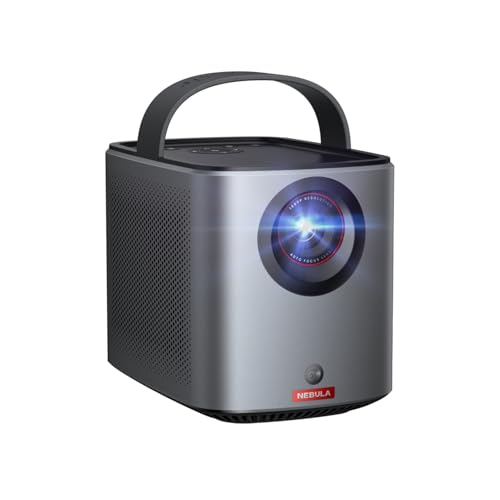
The Nebula Mars 3 Air is built for the American backyard movie night, the camping trip and the porch. It has a handle, a built-in battery and a smart platform, so you can carry it out, place it on a table and be watching in a couple of minutes. It is also modestly bright, which is the point worth understanding before you buy: a battery projector in this class is a dusk-to-dark tool.
This profile draws on the maker’s published specifications; where a figure is missing, we say so.
What the Mars 3 Air Is
According to Nebula, the Mars 3 Air is a DLP projector with a 0.23-inch DMD chip and an RGB LED light source with a listed life of 30,000 hours. Resolution is 1,920 by 1,080 and brightness is 400 ANSI lumens, with a 400:1 contrast ratio. It runs Android TV 11.0 with the Google TV interface, has Netflix built in, two 8 W speakers with Dolby Audio, and an HDMI 2.1 input with ARC. Nebula lists the weight as 3.7 lb (1.693 kg) and the size as 7 by 4.8 by 5.2 inches (178 by 122 by 133 millimeters). Nebula lists the noise level as under 28 dB.
Battery: The Real Story
The headline feature is the battery. Nebula lists 2.5 hours of movies and series in Eco Mode and up to 8 hours of music. Two things stand out. First, the 2.5-hour figure is for Eco Mode, which lowers brightness and cuts power draw, so a brighter setting should run for less time. Second, the figure is shorter than the runtime of many feature films once you count the opening credits, so for a long movie you should plan to connect the charger or a wall outlet for the last half hour. The page does not list the capacity of the battery in watt-hours, so we will not estimate it.
Nebula’s support FAQ says to check the level in Settings under System, Power and Energy, and it recommends Auto or Eco brightness to reduce drain. It also tells you that if the charging indicator is off, you should try a different adapter. Nebula’s spec page lists a 19 V, 4.74 A power input, which works out to roughly 90 W, so a small USB power bank will not charge or run it. Nebula’s pages do not mention power bank support.
For the movie that is longer than 2.5 hours, or a lazy Sunday of cartoons, keep the charger handy. If you want a projector that runs for days from a power bank, the XGIMI MoGo 3 Pro is the nearest of our picks, and it is documented for that use.
Picture and Brightness
At 1080p, the Mars 3 Air gives you a clean, sharp picture for 60 to 100 inches. It does not have a 4K panel, and at this size nobody should expect one.
Brightness is the more important question. Nebula uses ANSI lumens, a standardized measure that averages light output across the picture. The Mars 3 Air is rated at 400. That is a good number for a small portable projector, and it is much higher than the mystery lumen counts on some budget models. It is still a fraction of what a living-room projector delivers, and it makes the projector a night device. Outdoors, wait until it is properly dark. At sunset the sky is still bright, and porch lights, string lights and the neighbor’s yard lights all fight your picture. A dark backyard in late summer is a very different experience from a patio at 7:30 p.m. in June.
Two tips: use a white or light-gray screen or sheet and keep it taut, and put the projector as close as the picture size allows. Light falls off with distance, so a 60- to 80-inch picture looks noticeably brighter than a 120-inch one from the same projector.
Throw Distance and Placement
Nebula lists a 1.2:1 throw ratio, so the lens sits 1.2 times the picture width from the screen. Nebula’s support FAQ gives examples: a 40-inch picture at about 3.5 feet, a 60-inch picture at about 5.2 feet, 100 inches at about 8.7 feet, and 120 inches at about 10.4 feet. The spec page lists a 30 to 150 inch range, while the FAQ describes 40 to 120 inches. We would plan around the FAQ range.
The FAQ also notes the best results come from a distance of about 5.2 to 8.7 feet. The projector has autofocus and automatic keystone correction, and the support page tells you to nudge the projector or press the autofocus button if it is blurry. Manual keystone adjustment is in the Projector settings. Put it on a flat, stable table. On uneven grass, a small tripod or a stack of books is a better base than the ground.
Smart Features
Nebula lists Android TV 11.0 with the Google TV interface and built-in Netflix. The support page says that Netflix comes pre-installed, that more than 7,000 apps are available from Google Play, and that other apps can be installed from a USB drive. There are limits worth knowing:
- Netflix, Disney+ and other protected services cannot be mirrored or cast from a phone. Use their apps on the projector.
- Chromecast works over Wi-Fi, not Bluetooth, and works with Chromecast-enabled apps such as YouTube and Prime Video.
- If you see a message that the projector is not part of your Netflix Household, you may need a household account upgrade.
- The projector needs Wi-Fi. At a campsite with no signal, use your phone’s hotspot or load a movie onto a USB drive. Nebula says the projector supports FAT32 and NTFS drives of up to 4 TB.
Sound
Two 8 W speakers with Dolby Audio is generous for a projector this size, and fine for a small group on a patio. Outdoors, sound dissipates quickly and wind carries it off, so a Bluetooth speaker is a worthwhile addition for a bigger yard. Nebula says the built-in speaker shuts off when an external speaker or headphones are connected, and that Bluetooth Speaker Mode is available in the sound settings. This makes the Mars 3 Air double as a music speaker, with the lens off.
Campground quiet hours and neighbors matter too. Many campgrounds and state parks have quiet hours at night, so use headphones or keep the volume low.
Noise, Dew and Ownership Notes
A noise rating under 28 dB is quiet, and the fan should not compete with dialogue. Nebula’s pages do not list a weather resistance rating, so treat the Mars 3 Air as an indoor or covered-patio device. Dew can settle on a projector left out on a cool night, and condensation near the lens is a risk. Bring it inside when the movie ends. Nebula’s page mentions a hassle-free warranty, but does not state its length, so read the terms on the seller’s page.
Who Should Buy It
- Backyard movie-night hosts who want a battery for the first hour and an outlet for the second.
- Campers and RV owners who want a simple, self-contained projector and are happy to pair it with a charger.
- Anyone who wants Google TV and Netflix in a portable body, with a handle.
- People who watch in a dark room and want a projector that moves from room to room.
Who Should Skip It
- Anyone who wants to watch in daylight or with the lights on.
- People who want a 4K picture.
- Travelers who want the smallest possible projector: look at the Nebula Capsule 3.
- Buyers who need a rated weatherproof device.
Alternatives Among Our Picks
The Nebula Capsule 3 is smaller and lighter, with the same stated battery runtime and a dimmer picture, so it is the pick for kids’ rooms, tents and backpacks. The XGIMI MoGo 3 Pro is brighter at 450 ISO lumens, runs from a USB-C power bank, and has a ceiling-friendly stand. If you want a large picture and have an outlet, the Nebula Cosmos 4K SE is the step up.
See also the Nebula Capsule 3 profile and the XGIMI MoGo 3 Pro profile.
To see how it stacks up against the other nine models, read our ranking of the best projectors of 2026.
Sources